Projects Flagship
AI Workflow Studio
A desktop studio for building agentic workflows: model steps, conditions and tools on one canvas, run by a shared runtime, with explicit points where a person decides what happens next.
- Status
- Working prototype
- Built with
- TypeScript
- React
- Tauri
- OpenAI Agents SDK
- Source
- Private repository
The problem
Many business tasks are a mix of judgement and routine: read an enquiry, decide whether it matters, draft a response, send it. Language models are good at the judgement parts, but an automation that lets a model act without anyone seeing it is hard to trust — and hard to debug when it goes wrong.
AI Workflow Studio is built around that tension. Workflows are visible, every step is inspectable, and anything with consequences can be made to wait for approval.
What it does
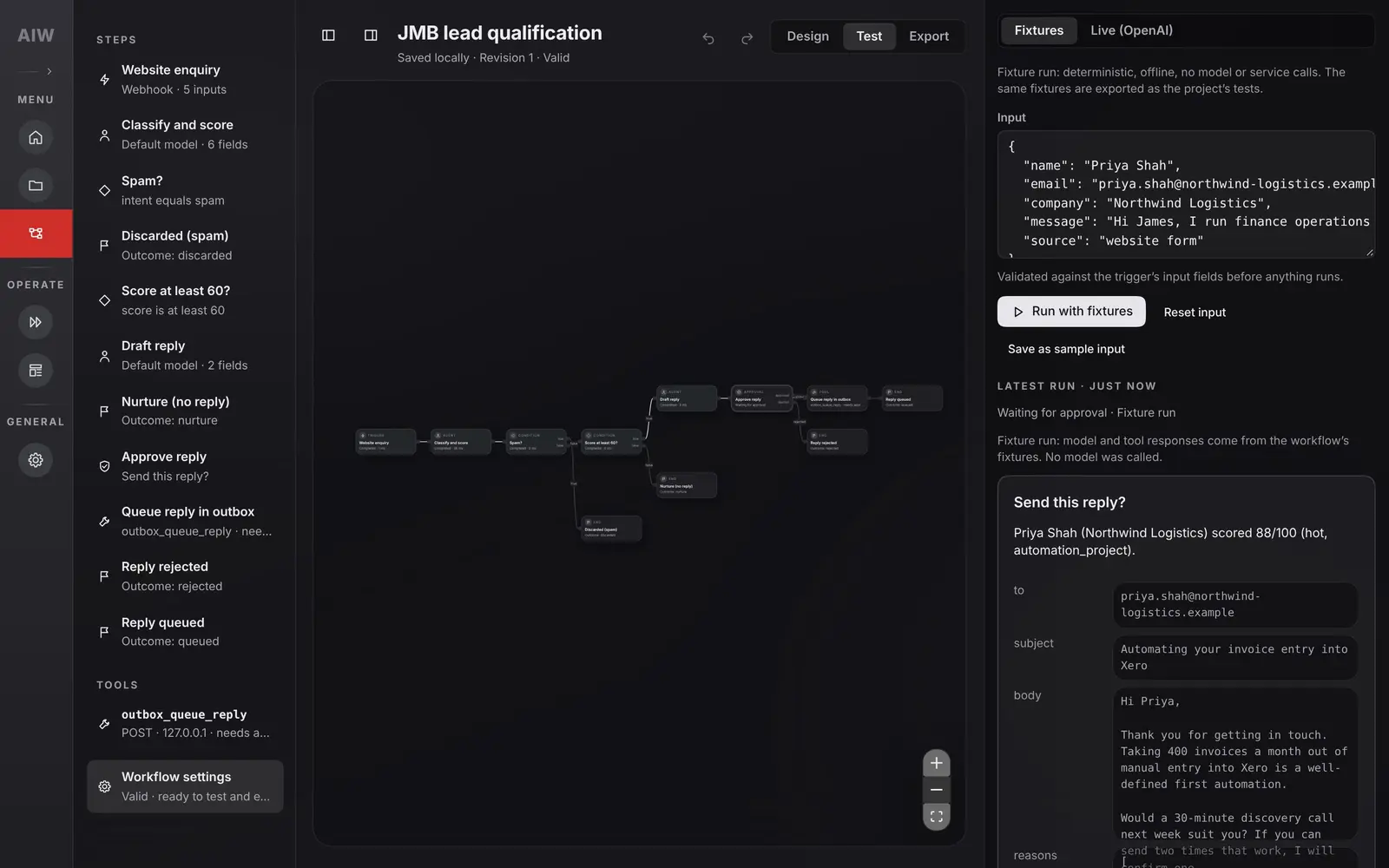
Workflows are assembled from typed steps — triggers, agent steps, conditions, approvals, tools and outcomes — in a React editor that runs as a Tauri desktop app. The example shown here qualifies inbound website enquiries:
- Website enquiry Webhook trigger with five validated input fields.
- Classify and score Agent step: intent, a 0–100 fit score, tier, reasons and red flags.
- Spam? Condition: spam ends the run as discarded.
- Score at least 60? Condition: lower scores end as nurture, with no reply.
- Draft reply Agent step: subject and body.
- Approve reply Approval checkpoint: the run waits for a person.
- Queue reply in outbox Tool call, retried up to twice, only after approval. A rejection ends the run as rejected.
The workflow has four named outcomes: discarded, nurture, rejected and queued. Queuing places the reply in an outbox; it does not send it. The capture above shows a run paused at Approve reply.
Guardrails and human oversight
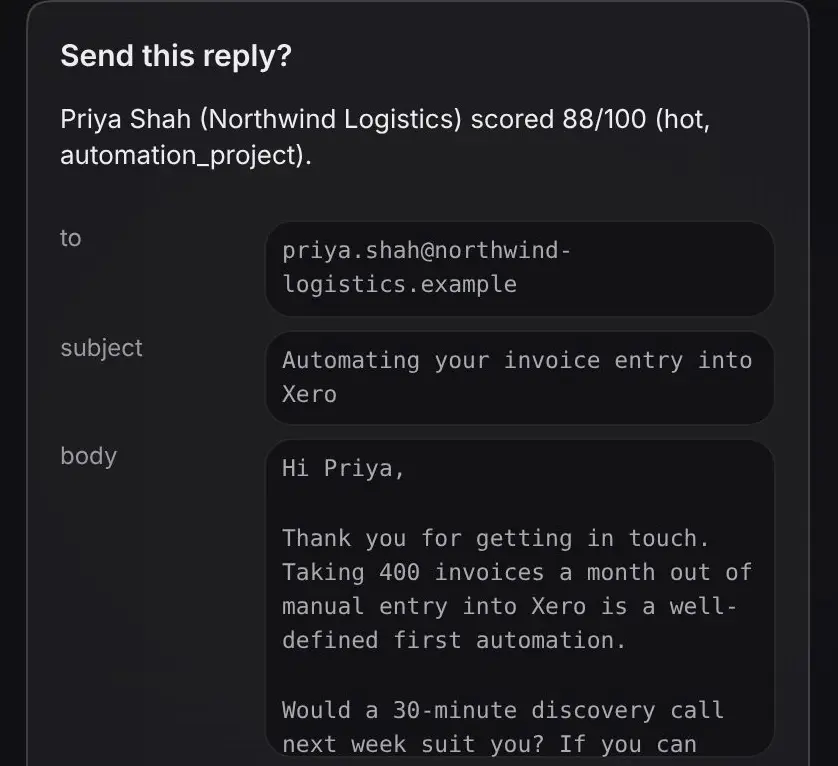
An approval step is a real checkpoint in the runtime, not a confirmation dialog. The run stops, its record is persisted, and resuming is validated before the workflow continues. The approver sees what the workflow is about to do and why: the score, the drafted message and the classifier’s reasons and red flags.
"type": "approval",
"label": "Approve reply",
"config": {
  "title": "Send this reply?",
  "message": "{{input.name}} ({{input.company}}) scored {{steps.classify.output.score}}/100 ({{steps.classify.output.tier}}, {{steps.classify.output.intent}}).",
  "details": {
    "to": "{{input.email}}",
    "subject": "{{steps.draft.output.subject}}",
    "body": "{{steps.draft.output.body}}",
    "reasons": "{{steps.classify.output.reasons}}",
    "red_flags": "{{steps.classify.output.red_flags}}"
  }
}The classifier is instructed to treat enquiry text as untrusted data written by a member of the public: not to follow instructions inside it, to note any such attempt as a red flag, and to score only the genuine business content. That is a prompt-level defence, which is why the approval step still matters.
Fixtures and live calls
Every run uses one of two modes. Fixture runs are deterministic and offline: model and tool responses come from fixtures stored with the workflow, so no model or external service is called. The same fixtures are exported as the project’s tests. Live runs call models through the OpenAI Agents SDK. The interface labels which mode produced each run.
Python steps are trusted code
Python steps run in a separate interpreter with resource limits and a restricted environment. They still run as the same operating-system user, so the source describes them as guardrails for trusted code, not a sandbox — and so does this page.
Architecture and trade-offs
- Desktop app
- React workflow editor
- Tauri SQLite storage
- Engine
- Loopback engine API
- Standalone export
- Runtime
- Shared workflow runtime
- Providers
- Fixture provider
- OpenAI Agents SDK
The central decision is one runtime. The studio, its tests and standalone exports all execute workflows through the same TypeScript package instead of separate implementations, so a workflow that passes its fixture tests in the studio is running the same code when exported.
Keeping the engine behind a loopback API separates the editor from execution: the interface stays a client of the runtime rather than a second place where workflow behaviour lives.
Testing and limits
The runtime has tests for approval and rejection paths using fixtures. The project’s own verification record for 2 November 2026 reports 886 unit tests passing with one conditional Python skip, 23 browser tests and 10 Rust tests passing; Docker checks were skipped on that machine. These are the project’s recorded results, not a run performed for this site.
- Template integrations are placeholders until connected, and none has run against a real client system.
- Python steps are not sandboxed, as described above.
- Desktop behaviour has not been verified on every platform, and no hosted CI runs are recorded for the inspected version.
Status and next steps
AI Workflow Studio is a working prototype. The next steps are connecting template integrations to test accounts and recapturing the interface with clearer framing of the workflow graph.